
WinDarab Free vs Expert: When to Move Up Now the Single-User Licence Is Under €1,000

Share:
Share:
By Andrius Kontrimas, Motorsport Engineer — Race Engineer in GT3, LMP3 and 24H Series. Founder of XTRA Motorsport.
Most privateers run the free version of Bosch Motorsport’s WinDarab for one reason: the full Expert version used to mean a three-seat licence at €2,580, which is hard to justify for one engineer on a single car. That maths has changed. Bosch now sells Expert as a single-user licence for under €1,000 (order number BG02.000.076, €998.89) alongside the existing three-user licence. For a one-engineer privateer or a small team, that is the difference between making do with the free edition and running the full analysis software.
This guide is the decision, not the brochure: where the free version stops being enough, what you gain at Expert, and which licence tier fits your operation.
WinDarab Free is useful — it will open Bosch .bmsbin files and let you look at traces. The problem is not what it does; it is the wall you hit the moment you start working seriously.
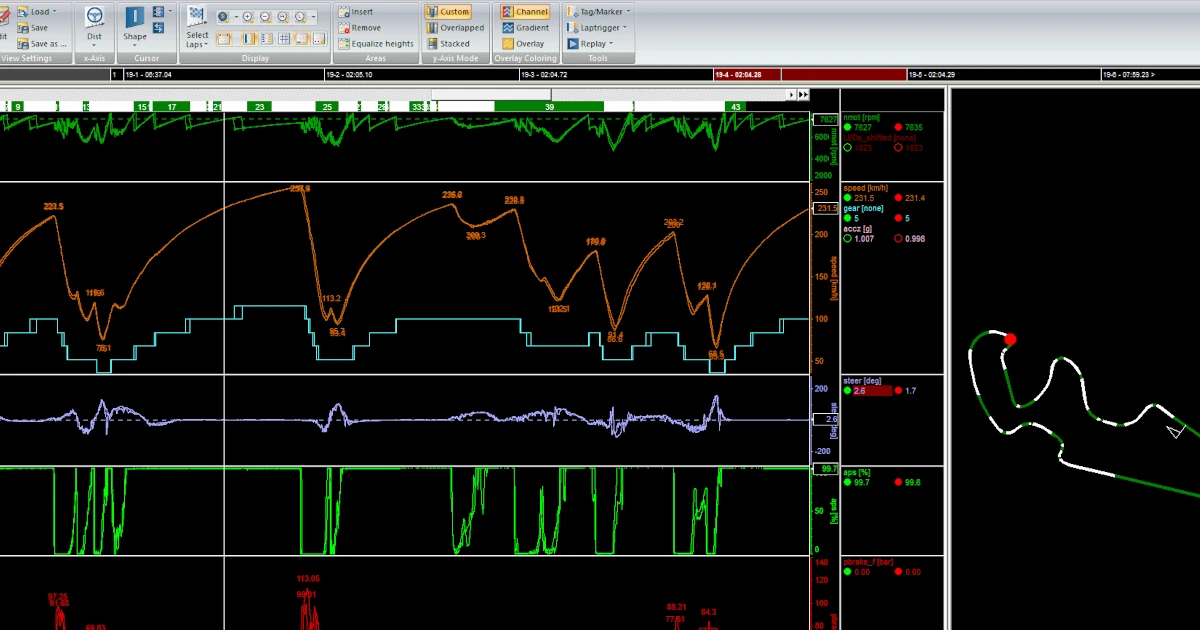
Free caps you at two open files and four data windows. That sounds academic until you are in the awning between sessions trying to compare your driver’s qualifying lap against the morning’s best, against a reference lap, against the same corner in the wet — and you can only hold two of them on screen at once. You cannot overlay. You cannot run lap analysis. You get basic math operators only, so you cannot build the channels that turn raw sensor data into answers.
In practice, the free version is a viewer. The moment your weekend becomes “why did we lose three tenths in sector two and is it the driver or the car,” it runs out of road.
The Expert feature list is long and the full comparison lives on the Bosch Motorsport WinDarab Expert product page. What matters is what those features let you do on a race weekend:
None of this is new to WinDarab. What is new is that one engineer can now buy it for under a grand.
One capability deserves its own heading because it is widely misunderstood: the Telemetry External Data Stream (Bosch order number BG02.000.066, an optional yearly licence on top of Expert).
It is not limited to Bosch Motorsport hardware. The External Data Stream lets WinDarab Expert display live telemetry from other systems — including MoTeC — so an engineer who already lives in WinDarab can watch a third-party logger’s data in the same tool, with the same overlay and math workflow they use for everything else. If your car runs a MoTeC dash-logger but you want one analysis environment for the whole garage, this is how you get it. (The External Data Stream requires an active maintenance licence; it is a Bosch order item we can supply on request.)
The External Data Stream handles live telemetry. For logged data, WinDarab Expert has a second door in: Import from text file (under Importing measurement data). Any logging system that can export to .txt or .csv can be read straight into WinDarab — which covers a large range of standalone ECUs and dashes whose own software you would rather not analyse in.
The workflow we use most is Emtron. We export a session log from Emtune — Emtron’s tuning software — and import it directly into WinDarab. Working with Emtron, we got this built into Emtune itself: in the Log Manager, under Export, there is now an “Export as WinDarab” option, so the file comes out already formatted the way WinDarab expects, with no manual column wrangling.
The piece that makes this usable day to day is alias channels. Emtron names its channels Emtron’s way; we name ours our way. With alias channels you map Emtron’s naming convention onto your own channel names once — and from then on every imported Emtune log lands with the channel names, units and groupings you already use across every other car. Build your math channels and report templates against your own names, and an Emtron import drops straight into them.
So between the live External Data Stream and text/CSV import, an engineer who has standardised on WinDarab can bring in both live and logged data from systems that were never Bosch to begin with — and have it all read in your own channel language.
Both tiers enable the identical full Expert feature set. The only differences are seats and how often you can move the licence between PCs:
Maintenance, the COM-API and the External Data Stream all use the same part numbers and the same price regardless of which tier you buy, so picking the 1 User licence does not lock you out of any add-on later.
A note on what to budget beyond the licence: Expert is dongle-free and activated over the internet, so there is no hardware to lose. To stay on the latest version and to run the COM-API or External Data Stream options, you need the annual maintenance licence. Engineers who want to automate WinDarab or build their own Ribbon plugins add the COM-API yearly licence on top.
Upgrade to the 1 User licence if:
– You are a privateer or small team running the free version and routinely hit the file/window limit
– You need to overlay laps and do real lap analysis, not only view traces
– You log with a Bosch Motorsport data logger (C70, C80) or a Bosch ECU and want the matched analysis software
– You want one tool to view both Bosch and third-party (MoTeC) telemetry
Stay on Free a little longer if:
– You only ever look at one session at a time and never overlay
– You are still deciding whether data analysis is part of your programme at all — in which case get the fundamentals straight before spending anything
For most people who have outgrown Free, the sub-€1,000 single-user licence is now the obvious step. It is the same software the professionals analyse with — the price was the only thing keeping it out of a privateer’s hands, and that barrier is gone.
WinDarab Expert sits in our Bosch Motorsport software range; the loggers that feed it live under Bosch Motorsport data loggers.